Made for educators & product builders

Record. Edit. Ship.
Beautiful screen videos.

A no-nonsense screen recorder & video editor for Windows. Record up to 4K with mic and webcam, add zooms, annotations, and motion blur — then export to MP4 or GIF. Pay once, use it forever on your PC.

One-time payment 5-year lifetime license Works on Windows 10 / 11
Everything you need

Record any screen.
Edit it like a pro.

The features serious creators expect — without subscription bloat or learning a new editing app.

4K capture, 60 fps

Record full-screen, a window, or a single tab. Choose resolution and frame rate per project.

Mic & system audio

Record voiceover and the audio playing on your computer at the same time, mixed cleanly.

Webcam overlay

Add yourself in the corner — round or square mask, multiple position presets, draggable.

Auto & manual zooms

Smooth zoom-and-pan effects added automatically, or place them yourself with adjustable depth and duration.

Annotations

Drop in arrows, text, shapes, and image callouts on top of your recording. Trim sections you don't need.

Wallpapers & motion blur

Wrap your recording in tasteful wallpapers, gradients, or solid colors. Add motion blur for cinematic pans.

Crop & aspect ratios

Hide parts of the screen with a crop box. Export at 16:9, 9:16, 1:1, 4:3, or any custom aspect.

Variable speed

Slow down to highlight a moment, speed up the boring bits. Different speeds across different segments.

MP4 & GIF export

Export to MP4 for sharing anywhere or GIF for embedding in docs and tickets — picks frame rate per format.

Three steps

Recording to ready-to-share
in under five minutes.

From hitting Record to handing off a polished video — see exactly what you'd be doing.

STEP 01
Entire Screen
Window
Tab
Camera

Pick a source

Whole screen, a single window, or a browser tab. Toggle mic and webcam, set resolution & FPS, hit Record.

STEP 02
00:42 REC

Record & relax

A tiny floating bar stays out of your way. The app records cursor positions in the background to power smart zooms later.

STEP 03
FormatMP4
Resolution3840×2160
Aspect16:9
QualityHigh
Export ↓

Edit & export

Trim, add zooms and annotations, swap the wallpaper, change speed of any segment. Export to MP4 or GIF in any aspect.

Inside WatShop Studio

What you actually get,
not stock photos.

Real screenshots and UI mockups from the app you'll be using minutes after you buy.

The editor

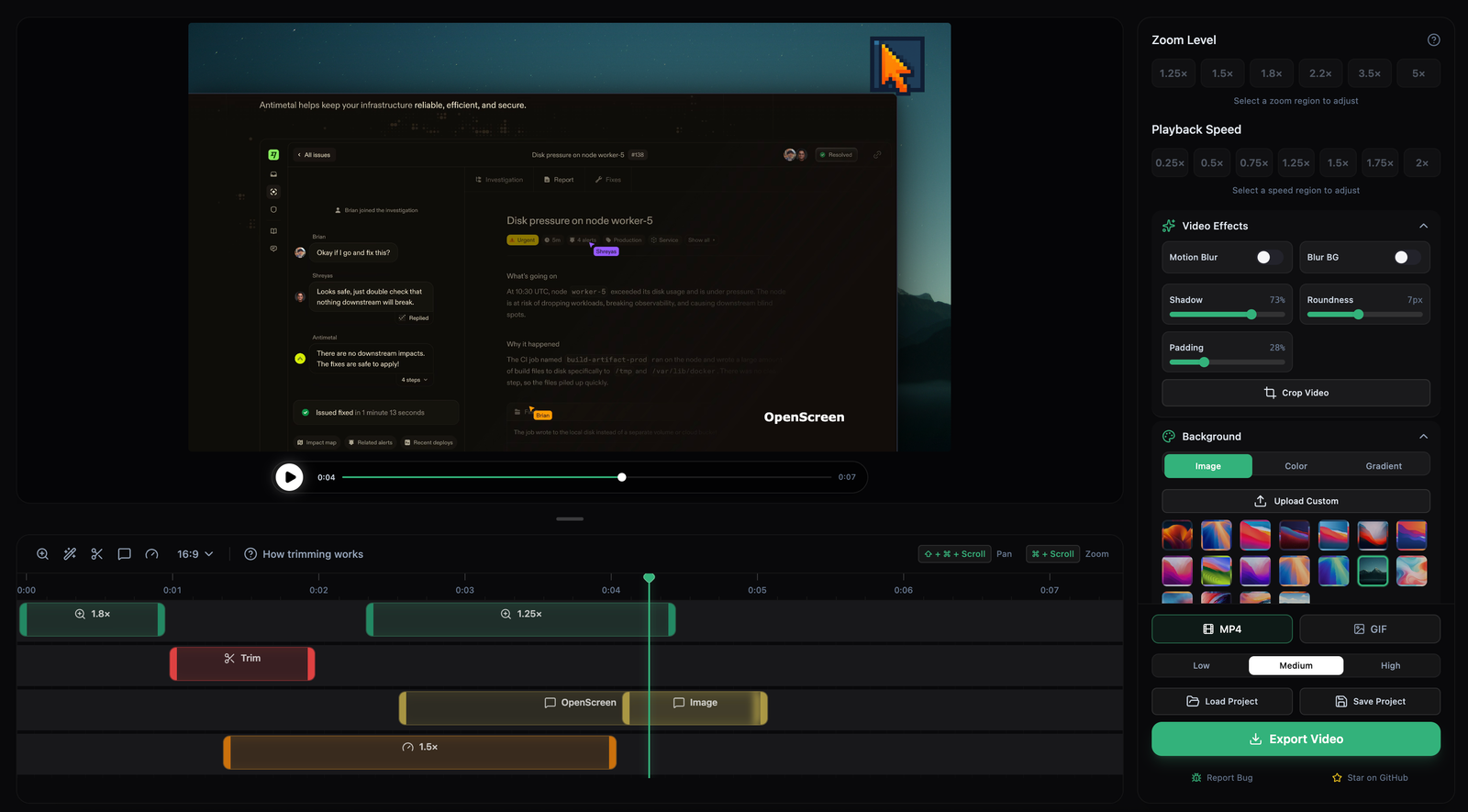
A timeline. A canvas. The right amount of buttons.

Drag zooms onto the timeline, scrub frame-by-frame, swap wallpapers, drop in annotations. Built so you spend less time learning the editor and more time finishing the video.

Editor view with timeline, multi-segment speed and a wallpaper background
First launch

One screen. One key. One PC.

Paste the license key we send on WhatsApp, hit Activate, you're in. The app verifies the signature locally so daily use works fully offline.

watshop studio

Activate your license

Enter the key you received with your purchase.
One key activates one PC for life.

LICENSE KEY
WATS-A8K3-J2P9-M5Q7-X4R2
Activate
— Don't have a key yet? —
Buy a license at watshop.in →
Smart zooms

Pan + zoom that actually looks good.

Pick a depth (subtle, normal, dramatic), set focus to follow the cursor or a fixed point. Motion blur smooths the transitions automatically.

Zoom · 2.5× · Follow cursor
DEPTH
Subtle
Normal
Dramatic
DURATION
0.0s1.2s2.0s
Pricing

One price. Forever.

No subscriptions. No upgrade fees. Pay once, use it on your PC for years.

Lifetime
WatShop Studio · 1 PC
999
One-time. 5-year license.
  • Unlimited 4K screen recordings
  • All editor features (zooms, annotations, blur, crop)
  • MP4 + GIF export, all aspect ratios
  • Mic + system audio + webcam overlay
  • WhatsApp support, free updates within license window
  • Activates 1 PC; you can move to another PC anytime
Buy now — ₹999 After payment, your license key is sent on WhatsApp within minutes. Need help? WhatsApp us.
FAQ

Honest answers to fair questions.

How does activation work?

After you pay, we send your license key on WhatsApp. Open WatShop Studio on your PC, paste the key in the activation screen, click Activate — done. Internet is needed once for activation, then occasionally for the weekly license check. Day-to-day editing works offline.

Why do you call it "lifetime" if it's 5 years?

Honest answer: software has running costs (license server, support). A 5-year license lets us keep things sustainable while still being one of the best deals out there. After 5 years, we'll offer a continued discount to existing customers — no surprise paywalls.

Can I install it on more than one PC?

One license activates one PC. If you switch to a new computer, sign out from the old PC inside the app (System Tray → License → Sign out) and your key will work on the new one. If your old PC died, message us on WhatsApp and we'll release the slot manually.

Do I need a fast internet connection?

No. Activation needs internet (a few hundred KB), and the app pings our server roughly once a week to check the license is still valid. The recording, editing, and export are 100% local.

What if Windows SmartScreen warns me?

WatShop Studio isn't yet code-signed (an OV cert costs around ₹15,000/year — we're getting there). When you run the installer, click More info → Run anyway. The app is safe and the source is on GitHub.

What about Mac and Linux?

Right now we only ship a Windows build. Mac and Linux are on the roadmap.

Refunds?

If WatShop Studio doesn't run on your PC for technical reasons within the first 7 days, message us on WhatsApp with a screenshot — we'll refund in full. We don't refund "I changed my mind" once the key is delivered, since it's already used.

Stop screwing around with subscription tools.

Pay once. Record beautifully. Ship faster. ₹999 covers your PC for the next 5 years.

Get WatShop Studio — ₹999